Hard Disk Drive Formatted Accidentally? Here’s How to Recover Your Data

In today’s time, where everything has become digital, each and every photo, video, and other important data is being saved on different devices and continues to grow every day. The increasing volume of data has also increased the need to store it on an external hard drive with larger storage capacity. However, while working with an external drive, users may encounter unexpected issues, and instead of opening the drive, the system displays a formatting error.

And without realizing the actual reasons and consequences, we hit the Format Disk button. The moment you realize what has happened, all your data appears to be gone! What will you do now? How will you fix this hard disk drive formatted accidentally error and recover your important files? This is one of the most common situations behind the hard disk drive formatted accidentally error.
Common User Scenarios of Hard Disk Formatted by Mistake
Have a look at the following real-life scenarios where users accidentally formatted their hard disks.
Scenario 1
Hard disk formatted by mistake. What should I do?
Hi, I am a professional photographer. I have a 1TB hard drive containing my entire work spanning around the last 2–3 years. While saving my current data this weekend, I accidentally formatted my hard drive and lost my entire data. I urgently need to recover data from formatted drive. Please suggest me some solution ASAP.
Also read : How to unhide hidden files in USB caused by virus?
Scenario 2
While deleting unnecessary files, I mistakenly formatted my hard drive and lost the entire data. How can I get my data back as it contains many important official files and my personal data too?
Scenario 3
I formatted my hard disk drive without anticipating that it would delete all my data saved on it. After connecting my hard disk to my laptop, a message appeared asking me to format the drive. Without knowing the consequences, I went ahead with the process only to realize later what a huge mistake I had made. All my data is gone and nothing is left on the disk. I don’t know what to do now. Can you help me recover my data? It would be of great help. Thanks.
Also read : Easy guide to fix disk read error occurred Windows 10
How to Recover Formatted Hard Disk
Accidental formatting of a hard drive can create a panic situation for anyone, especially when a large amount of valuable data is stored on it. However, one important thing you should know is that formatting does not immediately erase your data. Instead, it marks the storage space as available for new data. Your files are still present on the drive until they are overwritten by new information.
The main problem arises when new data gets written to the drive, overwriting the old data. Once this happens, formatted hard drive recovery becomes much more difficult. That is why time plays a crucial role in recovering data from a formatted hard drive.
Fix Accidental Formatted Hard Disk Drive Error with Expert Solution
For the best recovery results, it is recommended to use a professional solution like CubexSoft Data Recovery Software.
The utility is easy to use and provides a quick solution to recover data from a formatted hard drive. The software is capable of extracting all types of data, including documents, photos, videos, audio files, ZIP files, EXE files, email messages, and many other file formats.
The tool supports multiple external storage devices from popular brands such as Seagate, Sony, Samsung, HP, Toshiba, and many others. To understand the complete working procedure, you can download the free demo edition, which supports all Windows versions, including Windows 11, Windows 10, Windows 8.1, Windows 8, and earlier editions.


Also read : Fix External hard drive not showing up on Windows 10 Error
When Formatting a Hard Disk Becomes Essential
Although formatting is often considered a destructive operation, it is not always a bad thing. In many situations, formatting becomes necessary to make a hard drive usable again.
Modern operating systems communicate with storage devices through supported file systems. If the file system becomes damaged or corrupted, formatting may become the only practical solution.
Below are some common situations where formatting becomes necessary.
1. Disk Errors
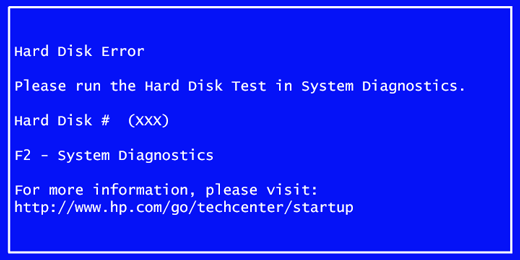
Disk errors are among the most common reasons behind accidental hard drive formatting. While connecting a hard disk to the computer, users often receive the message:
“Disk drive is not formatted. Do you want to format it now?”
Without understanding the consequences, many users click the Format button to convert the drive from RAW to NTFS/FAT32, resulting in the loss of important data.
2. File Accessibility Issues
Modern file systems use advanced permission settings to ensure that only authorized users can access specific files. Sometimes these permissions create accessibility issues.
Although such problems can often be resolved without formatting, in some cases users temporarily move the files elsewhere, format the storage device, and then copy the files back.
3. Performance Issues
Older hard disk drives often become slower after years of continuous usage. Data fragmentation and file system inconsistencies can reduce overall performance.
In many cases, formatting becomes the simplest and most effective way to restore the drive’s performance.
4. Different File System Support
Different operating systems support different file systems. Therefore, formatting becomes necessary while switching storage devices between Windows, macOS, and Linux.
5. Virus or Malware Attacks
Virus and malware attacks can severely damage a storage device. Some advanced malware can encrypt or corrupt the file system before users even realize what has happened.
In such situations, formatting the hard drive may become necessary to make it usable again.
6. Data Corruption
Data corruption can occur due to various reasons such as improper shutdowns, bad sectors, power failures, or file system damage.
In severe situations, corruption affects the entire file system, leaving formatting as the only option to reuse the hard drive.
Also read : Recover accidentally deleted files from Android SD Card in simple steps
Conclusion
Sometimes formatting a hard disk appears to be the quickest solution for resolving serious file system errors, RAW drive issues, and disk corruption. However, accidental formatting can result in the loss of valuable data.
In this blog, we discussed the common situations that lead to the Hard Disk Drive formatted accidentally error, explained when formatting becomes necessary, and shared the best approach to recover data from a formatted hard drive using a professional recovery solution.
If you need more information about formatted hard drive recovery or face any issues while recovering your data, you can contact our technical support team, available 24×7.
Need to Permanently Erase Data Instead of Recovering It?
If your goal is to securely remove sensitive files before selling, donating, or disposing of a hard drive, simply formatting the disk isn’t enough. Formatted data can often be recovered using specialized recovery software. In such cases, the CubexSoft Data Wipe Tool permanently erases data using secure wiping algorithms, making it virtually impossible to recover. It’s an ideal solution for organizations and individuals who want to protect confidential information from unauthorized access.

