How to Backup Hornet.com Email to Office 365, Gmail & Other App, Format
Utilize advanced solution to backup hornet.com email to Office 365, Outlook, Gmail, MBOX, and other popular file format & web apps. So if you are seeking for hornet.email backup to Outlook 365 and other web app or file format then focus on this write up that will explain a genuine and smart solution for doing it.
In these days web cloud mail data backup has become very important part of data safekeeping and to save a set of all business mail data information, so that anyone can restore the data when the actual messages are missed or deleted. But the problem is that various backup methods are challenging to access, adding more burden to the IT infrastructure.
At this time CubexSoft is here with a perfect and simple to access solution that will eventually lessen the burden on users. Thus the write up will help to properly backup business mail service Hornet.Email webmail. Read the smart solution to migrate Hornet.email account on hard drive format & webmail app.
What is Hornet.Email
Hornet.email webmail is a very popular web app for business purpose that users can access under the hornet.email address. It also provides basic services – send & receiving mails, generating mails, manage data. It also provides a collaboration platform for handling tasks, events, calendars, creating address books.
So the Hornet.com email is a cost-efficient & good solution that offers same AI supported safety mechanism as Office 365 but meanwhile cyberattacks are so rampant in these days that is so significant to convert Hornet.email account data.
For backup Hornet.com email account business mails, organization can feedback their clients mail discussions sales mail transaction narratives & more for entire users or all organization’s mail histories. It provides automatic archiving mechanism service but its backup is kept only 14 days.
Losing or missing Hornet account data because of cybercrime, data corruption or unintentional deletion may be a great loss to your business operations. But users can avoid it through backup of Hornet.Email account data on your local system & other webmail app – Office 365, Gmail, Exchange Server, etc.
How to Convert Hornet.Email to Office 365 & Other Format on Windows & Mac
For Hornet.Email backup to Outlook 365, Gmail, PST, OLM, EML, MBOX, Exchange Server, and other file format for hard drive, webmail app, take help from CubexSoft Hornet.Email IMAP backup Tool that is designed with smart features & skills that provides accurate, advanced & safe backup result of Hornet.email account database. Users can easily access the tool to get mails backup from Hornet.com account data service to another web app & hard drive format. Using it, you can backup or copy your data on your hard drive or other webmail app for future reference and secure your data without any change.
The Hornet.email migration tool is efficient and easily downloadable on both Mac & Windows OS.


How to Migrate Hornet.Email backup to Office 365 & Other Popular
The multi-skilled Hornet.com Email backup software is a reliable method that helps to directly migrate emails from Hornet.com account mail service to Office 365, Gmail, Yahoo Mail, Exchange Server, PST Outlook, EML, MBOX, OLM, etc. The tool is rapid solution and you can also convert unlimited emails from multiple Hornet.email accounts to other saving option at once; save your time from one-by-one processing. It helps to export selective mails from large Hornet.email account with its filter options. It works smoothly with smart & simple steps. To know how to convert Hornet.com emails, follow the given steps –
- First of all, download, install and launch the program on your system screen.

- Now fill your Hornet.Email IMAP Server details. You can also use its proxy server & batch mode feature at this time. Click on login button.

- It starts loading all data from Hornet account and also lists them in tree structure. Select the file by ticking on the checkboxes of the file.

- Apply filters according to your requirement from filters tab.

- Choose saving options as you need – Office 365, PST, Gmail, etc.
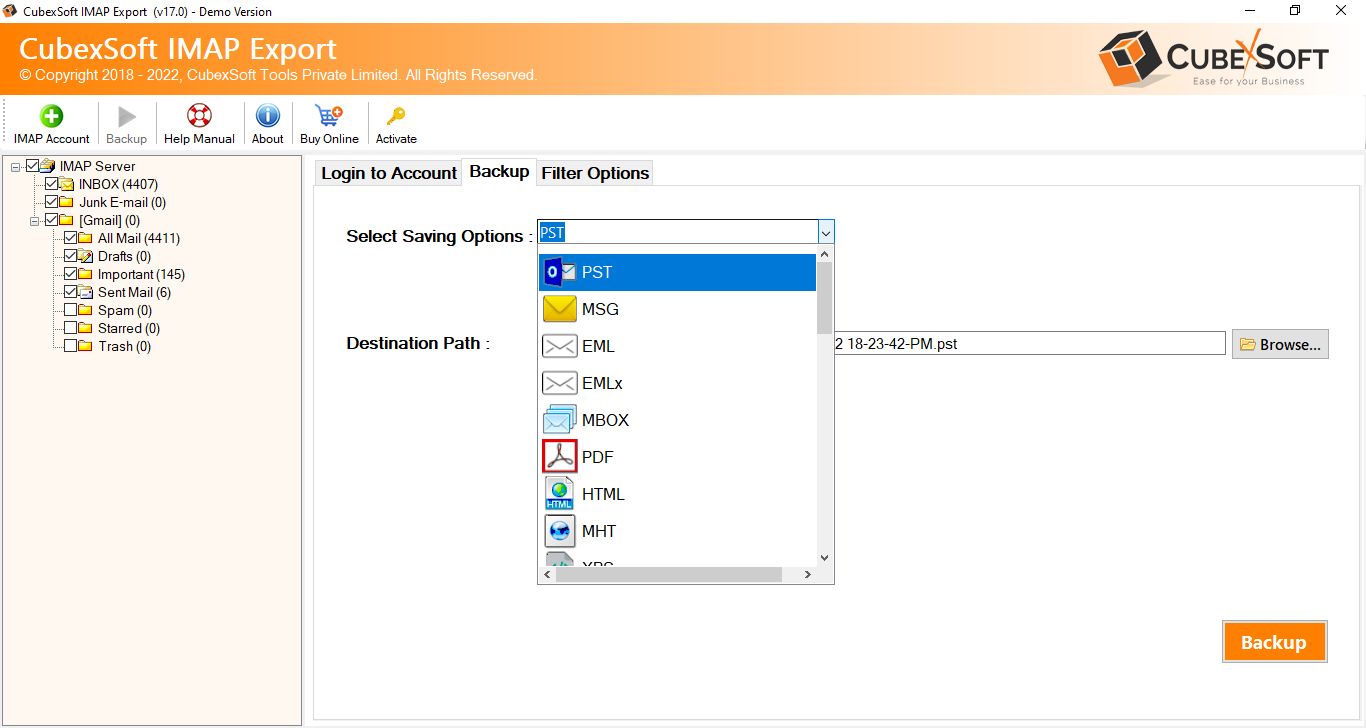
- Fill login details if you choose any webmail service for backup or choose desired options. Click on backup button.

- Backup process will start and also complete with a successful message.

Now you can check the backup result and it will be assured and complete. As you click on the confirmation message OK button, it will generate a log file in .txt format that explains all process status – timing, path, subject, number of files, etc. It has no limitations of files size & quantity for backup.
Reviews of the Backup Tool
I was using Hornet.Email and need to convert all data into Office 365. I previously used CubexSoft’s other solution then contacted them for this solution and got its IMAP Backup software. Seriously it worked and converted my all emails from Hornet account to Office 365. Later I also used its other services for my organization that was also superb.
I got CubexSoft IMAP hornet backup tool from Google and first of all I tried it and then used its complete edition. I achieved full data backup result of Hornet.email to Outlook 2016 for Mac. Thanks for providing complete result. I am really grateful to your smart process.
Conclusion
We have explained a smart & advanced solution, if you have any doubt or query then you can also try to clear entire doubts & confusions regarding how to migrate mails from Hornet.com to Outlook 365, Gmail, PST, and other file format & webmail app. Download it and then you are capable to try it without any charge. If you have any query or confusion then clear with our support team at any time.