Maximizing Control: How to Export Vaultastic Email Data

In today’s digital world, email communication plays a crucial role in both personal and professional spheres. With the increasing reliance on emails, it becomes essential to have a secure and reliable Vaultastic backup solution. Vaultastic, a popular email archiving service, provides users with a robust platform to store and manage their email data. However, there are instances where users may need to export Vaultastic email account to another webmail account or a local system client. This blog post will guide you through the process of exporting Vaultastic emails to Google Workspace, Zimbra, Yahoo Mail, Office 365, IMAP Server, PST, PDF, EML, MBOX, OLM, DOC, EMLx, MSG and many more, enabling you to maximize control over your valuable information.
Vaultastic is a trusted cloud-based email archiving solution designed to ensure data integrity, security, and compliance. It seamlessly integrates with your existing email infrastructure, capturing all incoming and outgoing messages, including attachments and metadata. With Vaultastic, users can easily access and search their archived emails, even if they have been deleted from the primary mailbox. This archival service offers scalable storage, encryption, and tamper-proof retention, ensuring that your data remains protected and accessible at all times.
Why Users Need to Backup Vaultastic Emails
- While Vaultastic ensures reliable email archiving, having an additional backup of your Vaultastic emails adds an extra layer of protection against data loss due to unforeseen circumstances such as system failures, accidental deletions, or cyber threats.
- Many industries have strict regulations regarding email retention and retrieval. By exporting Vaultastic email data, users can meet compliance obligations and fulfill legal requirements if necessary.
- Users may decide to switch to a different email service provider or migrate to a local system client. Exporting Vaultastic emails enables a smooth transition by transferring all crucial data, including attachments, folders, and organizational structure.
- Having a local copy of Vaultastic email data allows users to access their archived messages offline or without relying on an internet connection. This can be particularly useful in remote or low-connectivity environments.
- Exporting Vaultastic emails to another webmail account or a local system client helps consolidate email management, allowing users to centralize their communication channels and streamline their workflows.
How to Export Vaultastic Emails in Simple Steps
While some users may attempt manual methods to transfer Vaultastic email account data to another webmail cloud account or local system, these approaches can be highly risky and time-consuming. Instead, users who are in need of a secure, straightforward, and advanced solution to backup Vaultastic emails can rely on the CubexSoft Vaultastic IMAP Backup Tool. This software offers a safe and efficient way to export Vaultastic emails, ensuring that users can perform the backup Vaultastic to Google Workspace, Office 365, Yahoo Mail, Exchange Server, PDF, PST, EML, EMLx, MBOX, MSG, IMAP Server and many more options quickly and without any complications. The program is for both Mac & Windows OS users so for trying it download according to your requirement.


Working Guide of Vaultastic Email Migration
- First of all, download Vaultastic Email backup tool and launch it on your computer screen.

- Fill IMAP settings with login details of Vaultastic email account. Here, users can also go with batch approach and proxy server options. Click on login button.

- Now it loads all data in folder structure. Select files by ticking on the checkbox of the file.

- If need specified emails migration then apply filters from filters tab.

- Choose backup option like Gmail, Office 65, Exchange Server, PST, PDF, EML, MBOX, EMLx, and others.
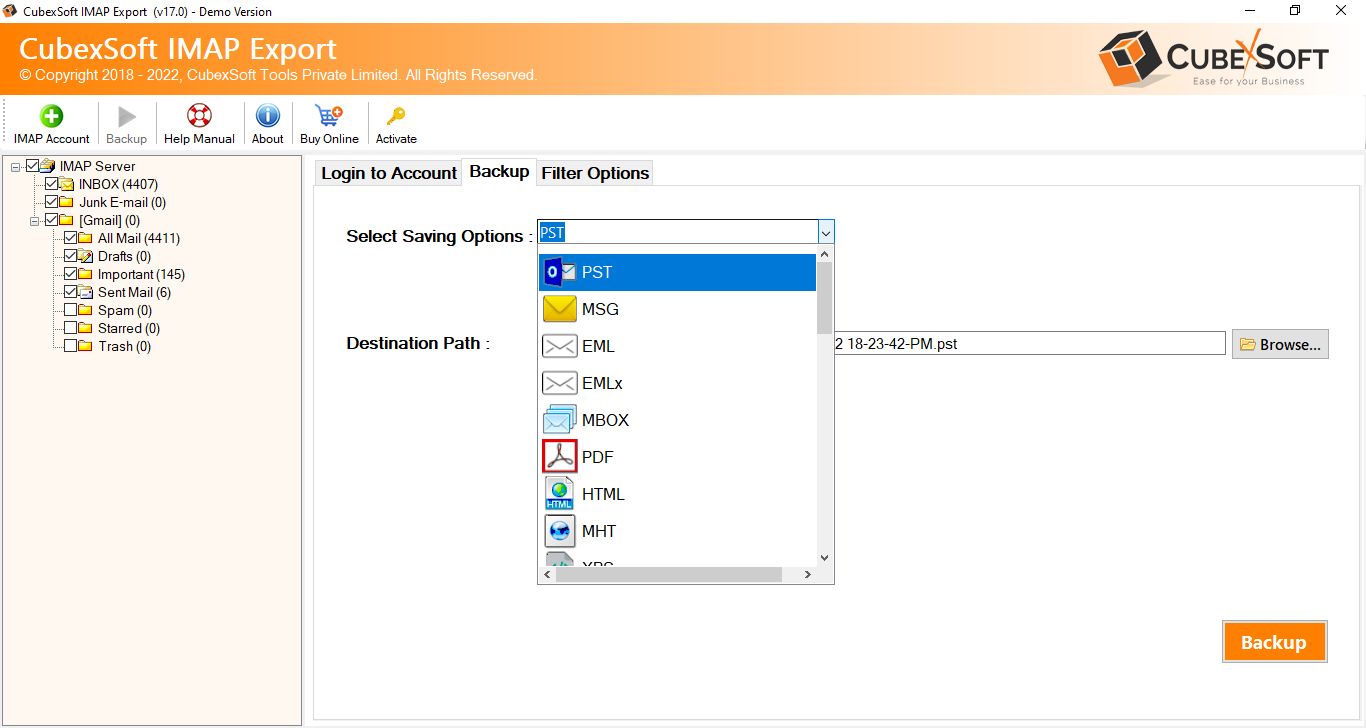
- Now fill required and desired options to export Vaultastic account data. Hit on the backup option.

- Conversion process will start, finish with a successful message.

It is a reliable and efficient software solution designed to export Vaultastic emails to various formats, providing users with flexibility and control over their email data. This tool offers a user-friendly interface and advanced features that simplify the process of exporting Vaultastic emails.
Key Features of the Vaultastic Backup Tool:
- Vaultastic Compatibility: The Tool is specifically designed to work with Vaultastic email accounts. It seamlessly connects to Vaultastic’s IMAP server, allowing users to directly access and export their emails.
- Multiple Export Formats: The tool supports a wide range of export formats, including PST, EML, MSG, MBOX, PDF, HTML, and more. Users can choose the format that best suits their needs and preferences for accessing and storing their Vaultastic emails.
- Selective Email Export: With the program, users can selectively export Vaultastic emails based on specific criteria such as date range, sender, recipient, subject, or specific folders. This selective export feature helps save time and storage space by focusing only on the required emails.
- Folder Hierarchy Preservation: The tool maintains the original folder hierarchy of Vaultastic emails during the export process. This ensures that the exported data retains the same organizational structure, making it easy to navigate and search for specific emails.
More Attractive Features
- Email Filtering Options: Users can apply advanced email filtering options to exclude unnecessary or unwanted emails from the export process. This allows for a more refined backup that focuses on essential messages, and folders.
- Batch Export: The tool supports batch export functionality, allowing users to export multiple Vaultastic mailboxes simultaneously. This feature is particularly beneficial for organizations or individuals managing multiple email accounts.
- Robust Performance: The CubexSoft IMAP Backup Tool is designed to handle large-scale data exports with optimal performance. It ensures high-speed data transfer, minimizing the time required to export Vaultastic emails.
- Data Integrity and Security: The tool ensures data integrity during the export process, preserving email attributes, metadata, attachments, and folder structures accurately. Additionally, it maintains the security of Vaultastic emails by encrypting the exported data and providing password protection for the exported files.
- User-Friendly Interface: The software offers a user-friendly interface that requires minimal technical expertise. The intuitive layout and step-by-step instructions guide users through the export process, making it accessible for both novice and experienced users.
Conclusion
We explained Vaultastic Mail Backup Tool which provides a comprehensive solution for exporting Vaultastic emails. With its compatibility, versatile export formats, selective export options, and other advanced features, it offers users the control and flexibility they need to efficiently manage and backup their Vaultastic email data. Still, have doubt or confusion then download it and migrate 25 emails from Vaultastic email account to another cloud and file format without any cost. Therefore, try and clear all doubt. If would like to clear further query then contact us our technical support team.
