Amazon WorkMail End of Life – Discontinued, Status, Risks & Alternatives

Is Amazon WorkMail Discontinued? Everything You Need to Know About Amazon WorkMail End of Life, Complete Guide & Smart Migration Solution
The discussion around Amazon WorkMail end of life (EOL) is no longer speculation—it has now been officially confirmed by AWS. If your business depends on Amazon WorkMail, it is crucial to understand the shutdown timeline, risks, and most importantly, how to safely migrate your data before it’s too late.
In this blog, we will explore everything about the Amazon WorkMail shutdown, its impact, and the best way to secure your emails using a reliable backup and migration solution.
What is Amazon WorkMail?
Amazon WorkMail is a managed business email and calendaring service offered by AWS. It allows users to access emails through Microsoft Outlook, mobile apps, or web browsers while maintaining enterprise-grade security and encryption.
Businesses have used WorkMail for –
- Secure communication
- Calendar management
- Integration with Active Directory
- Cloud-based email infrastructure
However, despite these features, WorkMail never gained widespread adoption compared to competitors like Microsoft 365 and Google Workspace.
Amazon WorkMail End of Life – Official Announcement
AWS has officially announced the end of support for Amazon WorkMail.
Important Dates You Must Know –
- April 30, 2026 – No new customers will be accepted
- March 31, 2027 – Complete shutdown of Amazon WorkMail
After March 2027, users will lose access to all emails, contacts, calendars, and attachments permanently.
This means businesses must migrate or back up their data before the deadline to avoid permanent data loss.
Why is Amazon WorkMail Being Discontinued?
Although AWS has not disclosed detailed reasons, several factors contributed to this decision –
1. Low Market Adoption
Amazon WorkMail struggled to compete with dominant email platforms.
2. Limited Features
Compared to modern platforms, WorkMail lacked –
- Advanced collaboration tools
- AI-powered features
- Strong integrations
3. Slow Innovation
Feature updates were minimal, making the platform less competitive.
4. Shift in AWS Strategy
AWS is focusing more on high-demand services rather than niche productivity tools.
What Happens After the Shutdown?
Once Amazon WorkMail is discontinued –
- All email data will be deleted permanently
- No login or access will be possible
- IMAP/SMTP services will stop working
- Business communication may be disrupted
This is why early migration planning is critical.
Top Alternatives to Amazon WorkMail
Before migrating, you should evaluate alternatives –
- Advanced collaboration tools
- Outlook integration
Google Workspace
- Cloud-native productivity
- AI features
Zoho Mail
- Cost-effective business email solution
- AWS itself recommends switching to third-party platforms for continued email services.
Why Backup is Important Before Migration
Many users make the mistake of directly migrating without creating a backup. This can lead to –
- Data loss during transfer
- Missing attachments or emails
- Migration errors
- Compliance risks
- Creating a complete backup ensures your data remains safe even if migration fails.
Smart Alternate Solution for Amazon Email Migration
When it comes to securing your data before the Amazon WorkMail shutdown, the CubexSoft Amazon Backup Tool for Mac & Windows is one of the most reliable solutions available.


Key Features of the Skilful Amazon Workmail Conversion Tool
- Complete Email Backup – Download all emails, attachments, contacts, and folders from Amazon WorkMail without any data loss.
- Multiple File Format Support – Export WorkMail data into –
- PST
- MBOX
- EML
- MSG
3. Direct Migration Options – Easily migrate Amazon WorkMail to –
- Office 365
- Gmail
- IMAP servers
4. Bulk Backup Capability – Backup multiple accounts at once, saving time for businesses.
5. Preserve Data Integrity – Maintains folder hierarchy, metadata, and email formatting.
6. User-Friendly Interface – No technical expertise required—simple steps for all users.
How to Backup Amazon WorkMail Using Amazon Workmail Conversion Tool
Follow these simple steps –
Download and install the Amazon Email migration for Mac & Windows Tool

Enter your Amazon WorkMail login credentials

Select the folders you want to backup

Apple Filters for Selective Migration.

Choose the desired file format or email client.

Fill required options to save data into other file format / webmail apps
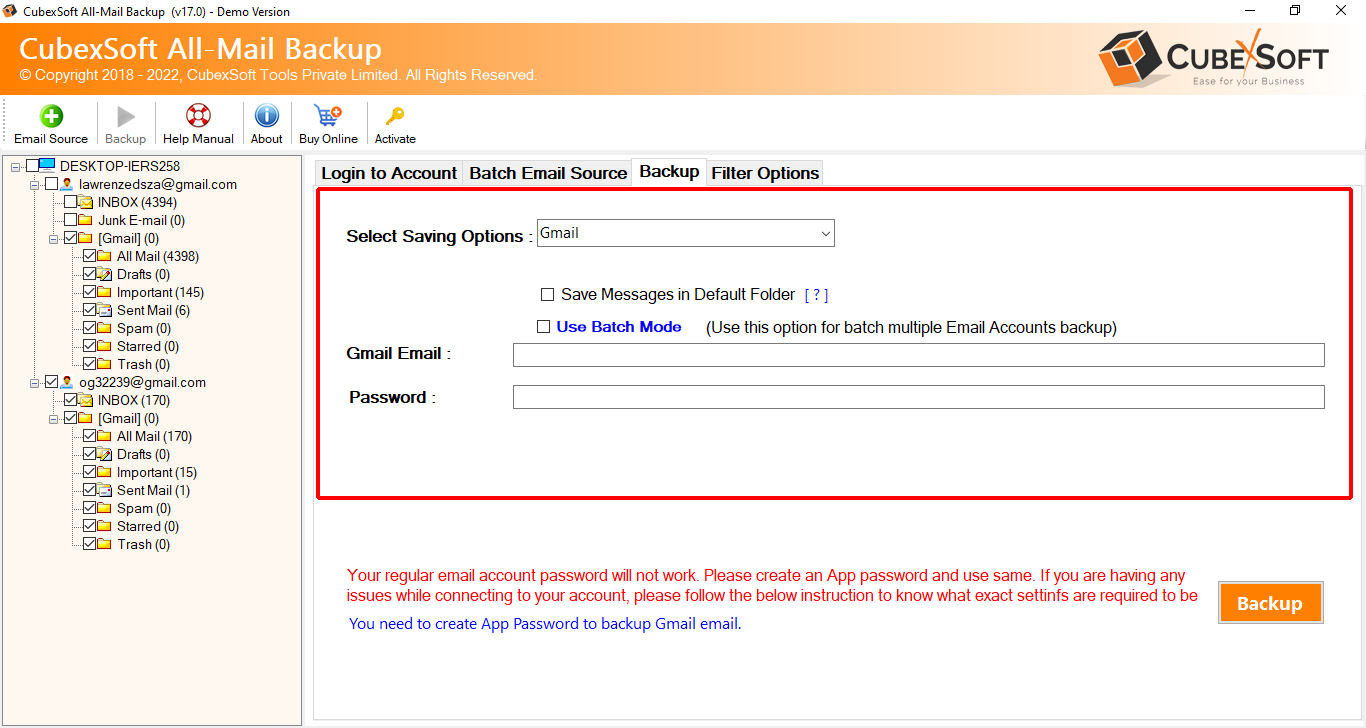
Click on the Backup button to start the process.

Within minutes, your data will be safely stored on your system.
Manual Method vs Professional Tool
Feature |
Manual Method |
the Tool |
Time Required |
High |
Low |
Data Safety |
Risky |
Safe |
Bulk Backup |
No |
Yes |
Email Formatting |
May change |
Preserved |
Technical Skills |
Required |
Not required |
Clearly, a professional tool provides a more efficient and secure solution.
Why You Should Act Now
Waiting until the last moment can cause serious issues –
- Server overload during final months
- Migration delays
- Risk of data corruption
- Business downtime
Experts recommend starting migration at least 6–12 months before the shutdown deadline.
Conclusion
The Amazon WorkMail end of life is now officially confirmed, with a final shutdown date of March 31, 2027. Businesses relying on this service must take immediate action to avoid data loss and disruption.
The best approach is to –
- Backup your WorkMail data
- Choose a suitable alternative
- Perform a secure migration
Using a trusted Amazon migration Tool for Mac & Windows ensures a smooth, secure, and hassle-free transition.
FAQs
❓ Is Amazon WorkMail discontinued?
Yes, AWS has announced that Amazon WorkMail will shut down on March 31, 2027.
❓ Can I still use Amazon WorkMail?
Yes, existing users can continue using it until the shutdown date.
❓ What is the best alternative to Amazon WorkMail?
Microsoft 365, Google Workspace, and Zoho Mail are top alternatives.
❓ How do I backup Amazon WorkMail emails?
You can use the Amazon Migration Tool to securely download and save all emails.
If you are unsure how to proceed with backing up or migrating your data, it’s always a smart decision to connect with the expert support team. Their professionals are available to guide you through every step, from setup to successful data transfer, ensuring a smooth and error-free experience. Whether you are facing technical issues or need help choosing the right export option, expert chat support provides instant, reliable assistance to make your migration process quick, secure, and hassle-free.
